/
Future Events (Opportunities)
Future Events (Opportunities)
- Ryan Schefke
Owned by Ryan Schefke
Overview
Lead Liaison's integration with Customer Relationship Management (CRM) systems allows our platform to incorporate CRM opportunities into a marketers workflow when creating automations for lead nurturing, lead scoring, lead grading, segmentations and more.
Using Future Events
To use any of these triggers create a new Behavior-based Automation:
- New > Automation
- Select Behavior
- Under Trigger, search for opportunity
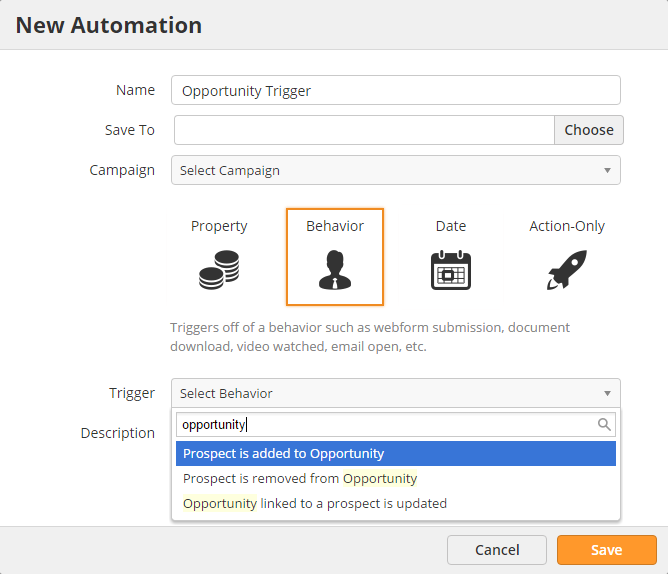
Triggers
Added to Opportunity
- Description = Matches any Prospect that gets added to an opportunity.
- Example = Trigger when someone is added to an opportunity with an amount greater than $100,000.
- Operators: None. When this Future Event / Trigger is added it continuously monitors the CRM for this change.
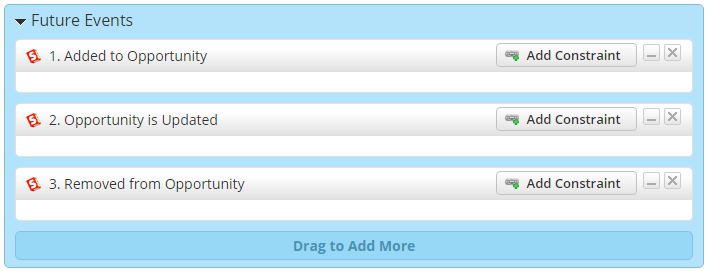
- Screenshot: Below
Opportunity is Updated
- Description = Matches any Prospect associated with an opportunity that gets changed.
- Example = Trigger when someone is associated with an opportunity and the amount changes to greater than $100,000.
- Operators: None. When this Future Event / Trigger is added it continuously monitors the CRM for this change.
- Screenshot: Below
Removed from Opportunity
- Description = Matches any Prospect that gets removed from an opportunity.
- Example = Trigger when someone is removed from an opportunity and the amount is greater than $100,000.
- Operators: None. When this Future Event / Trigger is added it continuously monitors the CRM for this change.
- Screenshot: Below
Effective Date
The Removed from Opportunity trigger only applies to opportunity data added after August 2nd, 2016.
Related content
Future Events (Activities)
Future Events (Activities)
More like this
Automation
Automation
More like this
Triggers
Triggers
More like this
Opportunities
Opportunities
More like this
Actions (Workflow)
Actions (Workflow)
More like this
Behavioral Automations
Behavioral Automations
More like this

© 2021 Lead Liaison, LLC. All rights reserved.
13101 Preston Road Ste 110 – 159 Dallas, TX 75240 | T 888.895.3237 | F 630.566.8107 www.leadliaison.com | Privacy Policy